Showing posts with label IT Stuff. Show all posts

Tuesday, May 03, 2011

Watch out on what you click on Facebook

With everyone eager to see the video on Osama being shot, spammers were extremely quick to take advantage on this. Many people were fooled by this message on their facebook wall (Osama Dead - Censored Video Leaked" by wikileaks some more):
It claimed that it is from wikileaks which should immediately warned us that it is probably a fake. When the linked was clicked, it immediately bring you to this page:
Be alert, CTRL+C is a short cut for "Copy", ALT-D is the short cut to the address bar (or URL bar), CTRL+V is the short cut for "Paste". Enter is to "execute" whatever is placed on the URL now. When I saw CTRL+C and CTRL+V, it immediately tells me that it is asking you to voluntarily copying and pasting something to be run.

Look carefully, the "Welcome" on the left is different! It has two tiny wheels, which means that it is an application. So, there is something running....

Just be careful with what "friend" sent as they could be spammer. There were just too many lately and we have no clue what the codes are doing to your computer. Normally it asked you for permission to access your profile.

(Thanks to my son, Ah Jon, who explained to me some of the more technical aspect of the code).

Tuesday, April 19, 2011

Fancy This ...

The prime minister’s announced today that every adult Malaysian will be given a 1 Malaysia email account and it is going to cost taxpayer RM50 million!! However, after much online protest, Pemandu has clarified that the government will not be financing the 1 Malaysia email account and that it would not be made compulsory.

It seems to imply that Tricubes Bhd which is in danger of being delisted from Bursa Malaysia due to financial irregularities, will finance the project. But where do they get the money from?

It is understood that the account is also part of a new one-stop web portal for government services, which will include social networking features as well as online bill payment and citizen application facilities.

I have free top notch e-mail accounts from google and hotmail. We have top notch free Friendster and Facebook. Now, our PM think that this new product is going to be better than google and hotmail or he has some other agenda? What do you think?

Further reports can be obtained from The Malaysian Insider and Malaysiakini here and here.

Saturday, March 19, 2011

Greenish Photos

My digital workflow was severely disrupted yesterday as I found that all my RAW images becomes greenish on my LCD monitor. I did some analysis and found that Ah Jon was playing with a new display card the day before on my computer. So, we figured that the colour management has messed up. Thanks God that I have a ColorVision Spyder which has quickly help me to generate a new colour profile. So, the problem is now fixed. The last time I had this problem, I need to re-install everything on my computer!

Saturday, October 16, 2010

Digital Miri City

On 14th Oct 2010, we saw the official launch of Digital Miri City Strategy.
Miri at night.
Launching by Deputy Chief Minister
A huge crowd turned up, comprising people from the government, Curtin, Shell and others.
Mr Teoh, big boss from Sain gave the opening speech.
Hellen from SSB signed on behalf of the company.
Planting of "3 pillars". I forgot what they mean.
Some of the staff from SSB.
Everyone was treated for a meal. There was more than enough food for everyone.
Catering was by Julia Catering. I think the food was not bad. Can be recommended!
Many stayed back for the grand lucky draw prize of an Apple iPhone. This lucky student from Riam got it!
I was hoping to hear the real plan to turn Miri into a digital City. But just high level talk!

Wednesday, July 01, 2009

Vegetable is still so cheap

Vegetables in Miri are still cheap, eg, kiucai is still RM2 per kg. This was what I paid 20 years ago.
Stephanie told me that Kangkong costs 7 pounds in UK for a kg. That is RM42 per kg.
The minimum paid is now about 5.50 pounds per hour. So, one has to work for just over an hour to buy 1 kg worth of kangkong. Anyway, kangkong is considered an exotic veggie in UK. It is similar to eating imported brocolli, etc. If comparison is done this way, our low paid labourer has to work one whole day to buy 1 kg!
So, those aspiring youngsters planning to go to UK or overseas, make sure that you eat local veggie/food now before you step on the plane. You will have to eat carrot, cabbage, sprout, tomato, brocolli, etc for the next one year or more! But I missed button muchroom so much. It is so cheap there!

Thursday, June 04, 2009

My PC has been attacked by Trojan

I noticed that my Laptop has been quite slow. Then it started to behave in a strange manner. I knew that my Messenger was hijacked. So, I consulted Ah Jon and he helped me to do a quick diagnosis and concluded that the "hijacking" is probably annoying and is not harmful. Then he left the System Configuration on. Just out of curiosity, I went to "Startup" and look through any item that looks alien.... I searched all the executables on google just to be sure.
Then ctfmon is found to be a trojan horse. This executable copies all my keystrokes and send it off to someone. Therefore, it steals confidential (eg. password) information from me!! Thanks God that I don't use this computer to do bank transaction.
After I removed this executable, my PC becomes faster instantly.
So, please do check your PC for trojan horse even when you have a anti virus software installed.

To run the System Configuration Utility, do the following: Start->Run->msconfig
To erase the file, you start up the computer in safe mode with command. This is done by pressing repeatably F8 when the computer just completed the BIOS startup. Select the appropriate startup option. When the Command window appears type:
CD C:\WINDOWS\SYSTEM32
DEL CTFMON.exe

Note:
Extracted from Neuber:
When you run a Microsoft Office XP program, the file Ctfmon.exe (Ctfmon) runs in the background, even after you quit all Office programs.
Ctfmon.exe monitors active windows and provides text input service support for speech recognition, handwriting recognition, keyboard translation, and other alternate user input forms. See How to uninstall CTFMON.EXE

Note: The ctfmon.exe file is located in the folder C:\Windows\System32. In other cases, ctfmon.exe is a virus, spyware, trojan or worm! Check this with Security Task Manager.

Wednesday, April 08, 2009

2009 Pikom Kuching

We went to visit the Pikom Kuching on 3-April-2009, ie, the opening day. The place was too crowded, too much merchandise and too small.
There is only one thing which would make Ah Jon very happy ... computer stuff!
Acer show off their "funny" looking gaming computer. Cost RM5888. Ah Jon told me that this is rather cool!
One gadget that is getting popular is the net book. Popular price is RM1499.
oh... speakers are getting fashionable now!
RAM, memory sticks, etc can be found everywhere!
Computer LCD for playing video...
See the crowded place ...
The smallest projector. Cost RM1700+. I think it is not worth it. Battery driven.

Saturday, January 24, 2009

IT Corner at Boulevard

Ah Jon told me that there is a new computer shop on the 2rd floor of Boulevard, Boulevard.

So, we decided to stray into that place yesterday. To my surprise, that corner looks really good... There is IT Computer, PC Image and Boulevard IT Store.
The deco is very nice.
Oh, Ah Jon told me that the new store sells "exotic" stuff also. He knows better than me.
By the way, Ah Jon is freelancing IT services. He just got himself a new bank book and a cash card and he set a limit of RM10! Hahaha... If you have computer problem, try him. His charge a nominal fees and give guarantee some more.

Friday, January 09, 2009

I washed my computer keyboard

My colleague commented that I have an old classic keyboard which I like very much. However, the only problem was the dirt accumulated over the years. After trying to clean it with a damp tissue paper, I was not the least happy because it was still very dirty. Then an idea came that I should try to wash it!
So I flipped over the keyboard and found a series of screws that I could remove. The rest is now history. I wash the keyboard under running water and what surprised me was that the dirt drop off so easily.

If you try it, please note that I am not responsible to any damage that may happen to your keyboard. Do use your common sense.

The other side of my keyboard has NO electronic. So it is safe to wash. But there are parts that may drop off.

The keyboard has one layer of soft plastic "key". Be careful not to damage this.

Monday, September 22, 2008

IT Technology of yesteryear - Computer Memory
I came across this plate of ancient (circa 1960-1970) computer memory. This is the earliest form of memory using magnetic core. The size of this plate is about 8 inch x 6 inch.

What you see is an array of tiny wires and circular magnetic core which is invisible under the naked eyes.

However, I took a closeup photo and amplify it and the circular magnetic core became visible. Click on the above to see an enlarged picture. The magnetic cores are black circular tiny rings which like donuts. Each of the above is 32x64 bits, ie, 256 bytes. On the plate, there are 18 such blocks. It seems that it is for 16bits CPU with 2 bits for error correction, etc.

It was made in USA. Cost? No idea.... must be US$1000s.

Compare this with a 1999 IBM RAM stick, each of 256MB. When it was first purchased, I think they cost the price of a detached house in Miri! Now, it cost less than US$20 per stick.

This memory board has 32KB of RAM. I assemble it myself for my single board microprocessor. It was in 1979 and cost around RM300. The computer can only program in assembly language or machine code or single BASIC.

Thursday, August 28, 2008

Down memory lane of old IT Technology (4) - Today, I will feature solid state storage
Once upon a time... actually it was mid 70's, when solid state memory first became "popular". I remember it was based on "MOS - metal oxide semiconductor" or CMOS technology. When it first came out, it can store an amazing 2Kbit of information, ie, 256 bytes on each chip! There are two major types of memory ... static (CMOS) and dynamic RAM. Eventually, dynamic RAM has evolved into the huge storage capacity on a single chip today. This is partly because of the semiconductor material being use which allows sub-micron fabrication.

This board store an amazing 512K bytes of memory. It was very expensive and I think it must had cost 1000s of dollars. This board was used on HP 3000 computer of the 80's.
The white tiny blocks are capacitor to filter off power spike.

This board was made by Nascom, the very first "personal computer". Oh... I build it myself from kit. It can store an amazing 32Kbytes memory! The brown round disc are capacitor to filter off power spike.

Now compare this with the two strips of memory which can store up to 4GB now. I think that is 125,000 times more capacity and occupy far less space.
The 32KBytes board was made in 1978/79 and the DDR RAM is the current year - 2008!
I have another piece of very interesting "solid state" storage. It is a 512KB of magnetic core memory. Not sure whether I can still find it.

Wednesday, August 13, 2008

Down memory lane of old IT Technology (3) - Today, I will feature storage devices
In fact, there are so many different types of storage devices developed over the last 30 years. This entry is just the beginning. For some of the devices, you need to see to believe.

The big round one is the oldest form of tape storage. How much data? It is 6250cpi (ie, it can store only 6250 bytes per inch. If I am not mistaken, each tape was 2400 feet long by 0.5 inch thick. Later, more exotic tape media came to the market with various storage capacity. This was mostly because of "desktop" type of equipment. So you can see here the various shape and size of tape devices.

The early CD ROM requires skill to load the media...

The CD was placed on a "clipper", inserted it into the holder. Then the complete holder was place in the drive. The drive cost more than RM1000.

Magnetic disk had come a long way. This platter was 14 inch across and can store an amazing 10MB of data!

See... the platter requires special housing.

The magnetic disk came in "hard disk", "semi hard" and rigid form. Storage capacities vary. My most interesting collection is an 8" floppy disk used by the good old Wang Word processor!

This is an optical disk, which is 12 inches across! I think the capacity is 512MB. It can of course do read write.

The old optical R/W disk. Each of these cost about RM100! Capacity? I can't remember. It is either 256 or 512 M bytes.
Visit to the Technology graveyard 2
I decided to put photos of old IT technology - just to remind ourselves what we have gone through.

During the good old days, ie, before the days of widespread use of laser printer, we used "fan fold" paper with holes on both side of the computer form/or paper. Sometimes, we printed on multi-plied paper. So, we need another machine to separate the multi plied paper.
This is one of them to separate a two plied paper.

This one is for 4 plied paper form.

Paper is fed through the top here.
Apologies for the quality of these photos. This big place is lit by one fluorescence lamp. So the place is quite dark. Flash was not used in order to preserve the nostalgic ambient.

Friday, August 08, 2008

Visit to a grave yard - see what I encounter


I visited the gave yard of a different kind today. If you want to know more, just continue to come back to this blog. I will have to photoshop my photographs so that the ghost is not visible.
For a start, make a guess... what is this item? I brought back this item for remembrance. It was dead for more than 10 years now. haih... this thing bring back interesting memories.

ok, answer... it is a HP pen plotter pen carousel (Pen holder). The pen carousel is inserted at the top right corner.

It can hold up to 8 pens of different colours. The pen tip can be ball point or fibre. When ever a pen of different colour is needed, it will pick it up from the carousel.

Tuesday, August 05, 2008

Solid State Disk
We got delivery of a solid state disk today... 80GB in size and on board, I counted only 24 large memory chips and another one with a large heat sink. Read more about it here.

This is an amazing piece of technology! Simply unthinkable! I can always remember when I was studying in UK back in the mid 70's. At that time, we are talking about assembly language programming, 8-bit CPU, and mini computer with 8KB memory, and mainframe computer with just 16KB RAM. Also, there was no graphical stuff. The best and most famous game was the lunar lander where we all tried to land the Apollo spacecraft on the surface of the moon.
When we talked about memory address space, we were talking about 16-bit (64KB) and 32 bits maximum. Beyond that, it was unthinkable. Now, we are talking about 64-bit address space. Oh... it was difficult to comprehend that sort of space at that time. No one will ever need such an address space. But reality came faster than we thought. We need it now and we are using that now.
Oh, I forgot, that card above cost RM9000!

In fact, when we bought the first personal hard disk in the mid 80's, it was 100MB and costing RM1000. I thought to myself, I could never finish filling up the space! Now, we are talking about 1TB for personal use. Cost? Probably about RM500.

Monday, July 14, 2008

Virus... a pain-in-the-neck! Show Hidden Files
By default, Windows doesn't show hidden files. This mean that you can't see them in window/file browser. This is heaven for viruses. Just like thieves, they would come to steal under cover - hidden and not seen and yet do the damages.

To show hidden files, do the following:
1. Start->Control Panel. You shall see the following window:
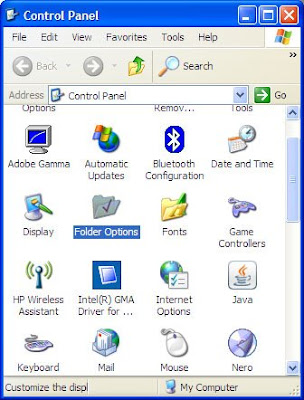

2. Double click on "Folder Options" a window will pop up. Click on "View" tab and you shall see:
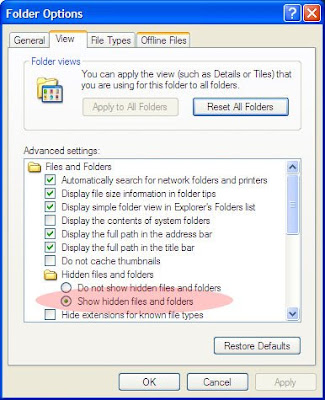
3. Click the radio button "Show hidden files and folders and then click "ok" button.
4. Close the Control Panel window.
5. Double click on "My Computer" icon on your desktop or where ever it is. The window below should appear. To make it easier for you to navigate, you may click on the "Folders" button.
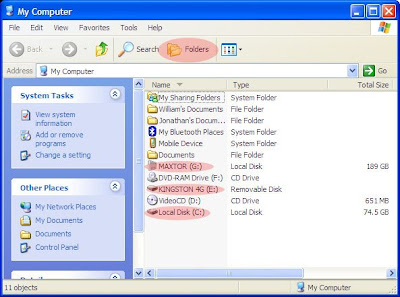
6. Click on all the drives listed one by one and look out for "autorun" file or "autorun.inf" file.
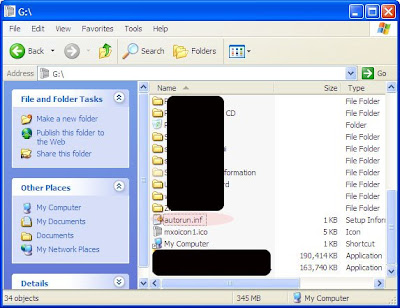
7. If you see "Autorun" at root directory, it may be linked to a virus program. If I were you, I would open the file (right click on the file name and select Open with... Notepad) and see what it is executing. Then I would delete the file if it is a virus. Warning: Not all autorun files are bad. Some are required to run the device or installation program. Do not delete if you are not sure.

Note: If you don't see the "Folder Options" in the Control Panel, a virus has probably disable it. You need more help!

I use the word virus to mean spyware, malware, "real" virus, etc.
Please go to the next blog to see how to disable autorun. This should prevent (reduce) active transfer of virus from one computer to the next via pen drive.